
flow5 compilation
Updated September 22, 2026
Contents
Back to table of contents
Code structure
Modules
flow5 is made of four modules
- flow5-app: the flow5 UI application
- flow5-io-lib: contains the methods to read and write files
- flow5-lib: the flow5 solver
- XFoil-lib: the XFoil program packaged into a library
The UI module
This module provides the interface to the pre- and post-processing of the calculations.
It requires the availability of the following libraries:
- OpenCascade development framework
- Gmsh SDK
- LAPACK and BLAS modules which can be provided by various libraries
XFoil
flow5 uses XFoil v6.94 as its 2d boundary layer solver.
The original Fortran source code has been translated to C++ and packaged into a library made of the XFoil class.
This library has been upgraded from xflr5 and is not compatible with the legacy application. Conversely, flow5 requires the upgraded library to run.
If the legacy XFoil-lib is installed as a shared library at user or system level, it should be uninstalled and replaced with the upgraded library.
This library does not have external dependencies.
flow5 solver
The flow5 solver module contains all objects and analysis classes to run 2d and 3d calculations.
It is packaged in the library flow5-lib.
The library depends on:
- the OpenCascade development framework
- the Gmsh SDK
- the LAPACK and BLAS modules which can be provided by various libraries
This module can be used as a low-level API by external applications.
flow5 Input/Output
The flow5 Input/Output module contains the methods used by flow5 to read and write files, e.g.
- project files (.fl5)
- XML files
- STEP files
- STL and OBJ files
It is packaged in the library flow5-io-lib.
The library depends on:
- the QtCore library
- the OpenCascade development framework
This module can be used as a low-level API by external applications.
Compiler
The source code requires a compiler supporting the c++20 standard. This is the case for all common compilers, i.e. gcc/g++, MSVC, CLang and MinGW.
Linux
flow5 compilation has been tested with gcc/g++ which should be provided by all distributions.
Compilation with CLang has not been tested.
Windows
flow5 compilation has been tested with MSVC which comes with the Visual Studio Community Edition.
Compilation with MinGW and CLang has not been tested.
MacOS
flow5 can be compiled with the MacOS version of Clang which comes with XCode.
External dependencies
Linux
The required packages can be installed with the following commands on the most pospular distros. (Thanks to shobhit727).
Arch Linux
sudo pacman -S --needed \
git base-devel cmake ninja \
qt6-base qt6-tools qtcreator \
openblas lapack \
opencascade gmsh
Debian / Ubuntu
sudo apt update
sudo apt install \
git build-essential cmake ninja-build \
qt6-base-dev qt6-tools-dev qtcreator \
libopenblas-dev liblapack-dev \
libocct-dev libgmsh-dev
Fedora
sudo dnf install \
git gcc-c++ make cmake ninja-build \
qt6-qtbase-devel qt6-qttools-devel qt-creator \
openblas-devel lapack-devel \
opencascade-devel gmsh-devel
openSUSE
sudo zypper install \
git gcc-c++ make cmake ninja \
qt6-base-devel qt6-tools-devel qt-creator \
openblas-devel lapack-devel \
opencascade-devel gmsh-devel
Other OS and distros
The step by step guide to install the dependencies on other OS and distributions is provided hereafter.
Installation from source
Integrated Development Environment (IDE) and Qt framework
The recommended IDE to explore and use the source code is QtCreator.
flow5 requires the Qt6 development libraries to compile, and the runtime libraries to run.
Linux:
QtCreator and the Qt development framework are likely provided by the distro's package manager. If not, download them from the Qt website.
Install QtCreator.
Install the Qt6 development libraries, usually identified by a "-dev" or "-devel" suffix.
Windows: QtCreator and the Qt development framework are available from the Qt website.
MacOS: QtCreator and the Qt development framework are available from the Qt website. Alternatively they can be installed via Brew.
External libraries
This section describes the main steps to install the above mentioned external libraries.
In Windows, Qt provides its libraries compiled with MSVC. To avoid potential ABI conflicts, the recommendation is to compile flow5 and its dependencies also with MSVC.
Compilation with MinGW has not been tested.
Note that linkage to the flow5 source code requires:
- at compilation time:
the path to the include directories containing the header (.h) files, and the path to the template libraries (.lib Windows) or to the shared libraries (.so Linux and .dylib macOS); the paths are set in the corresponding OS sections of the .pro files. - at run time: the availability of the shared libraries (.so, .dylib or .dll) in the local PATH.
Linear algebra
flow5 requires the following modules:
- BLAS
- LAPACK
Linux:
All libraries are provided by the distribution's package manager.
Install the development version of the following libraries, i.e. with a suffix "-dev" or "-devel":
- openblas
- lapack
Intel's MKL is an alternative which provides both modules.
OpenBLAS and MKL offer comparable performance.
The install process of the 'standalone' MKL library is a one-click installation procedure.
The selection of either OpenBlas or MKL is made by commenting/uncommenting the instruction CONFIG += INTEL_MKL in the flow5-app.pro and flow5-lib.pro files.
Note that switching from one library to the other requires the re-compilation of the source code.
Windows:
Intel's MKL library is required; issues have been encountred when linking to OpenBLAS.
One click install of the 'standalone' package from Intel's website.
MacOS:
The linear algebra libraries are provided by the native "Accelerate" framework. No action required.OpenCascade (OCC)
flow5 has been tested with OCC 7.9.3. and OCC 8.0.0.
Linux:
If your distro provides them, install the OpenCascade development libraries, e.g. occt-dev or occt-devel. The name depends on the distro.
If not, the source code for the OCC framework can be downloaded from the OCC website or the GitHub repository and must be compiled locally.
Windows
OCC provides a binary package for Windows. Note however that the binary libraries may or may not be compatible with your local compilers, depending on the respective Application Binary Interfaces (ABI). This can lead to undecipherable errors at runtime. If this occurs, compile the libraries locally.
MacOS
The OCC framework can be installed via Brew or compiled from the source code.
If using Brew, the installation of Gmsh will also install OCC.
Compilation and installation
The procedure follows the steps:
- Configuration of the compilation instructions
- Generation of the compilation instructions
- Compilation of the source code
- Installation of the libraries
1. Configuration:
OCC provides CMakeLists to configure the source code for compilation.
The procedure followed here uses CMake-Gui for convenience.
CMake-gui is provided by the distribution in linux, and is available from their website for Windows and MacOS.
- launch CMake-gui
- define the paths to the source code and to the build directory; it is good practice to build in a separate folder.
- select the compilers
- click "Configure" a first time to load the default CMakeList; the output will turn red.
- Not all modules are required by flow5. Deselect: Application framework, Draw, Visualization, TBB, FreeType.
- click "Configure" again; the output will turn white; some minor warnings may be printed in the bottom output pane.
2. Generation:
Still in the CMake-gui interface, click "Generate".
This will create a MakeFile in the build directory for Linux and MacOS, and a .sln file for Visual Studio in Windows.
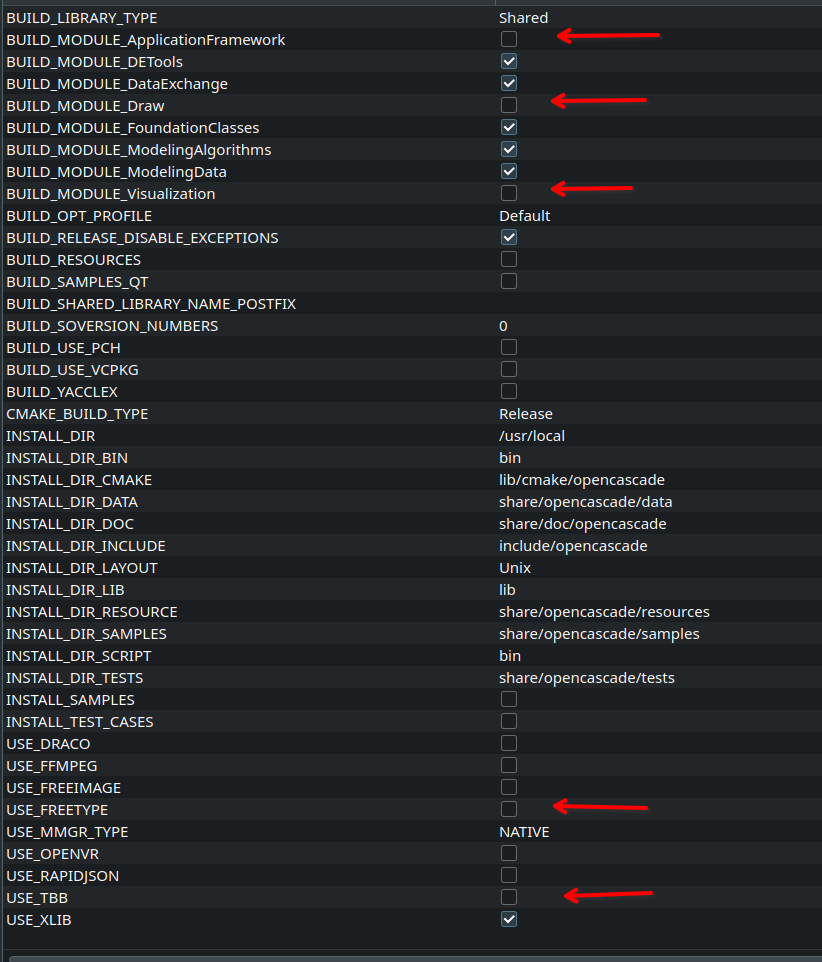
In Linux and Mac, open a terminal, move to the build folder i.e. where the makefile is located, and enter:
- make -jN where N is the number of threads allocated to the compilation process; this may take a little time.
In Windows, use Visual Studio to build the solution.
4. InstallationIn Linux and Mac, in the same build folder, enter:
- sudo make install to copy the header files into /usr/local/include/opencascade and the libraries into /usr/local/lib
- sudo ldconfig to register the libraries
In Windows, the simplest is to leave the libraries where they were built and to note the paths to:
- the include directory containing the header (.h) files,
- the lib directory containing the (.lib) template libraries,
- the bin directory containing the (.dll) shared libraries.
Gmsh
flow5 requires the Gmsh SDK (not the application!) to run.
flow5 v7.57 has been tested with Gmsh 4.15.0.
Linux: If your distro provides them, use the package manager to install the Gmsh development libraries, e.g. gmsh-devel. The name depends on the distro.
MacOS: use Brew to install Gmsh; this also install the OCC libraries. Alternatively, a binary package is available for download from the Gmsh website. The package is not notarized so that its usage will require explicit authorisation in the OS.
Windows: A binary package is available for download from the Gmsh website. Check ABI compatibility with the local compilers.
Compilation from source: The procedure is the same as for the OCC libraries. In the configuration phase, activate ENABLE_BUILD_DYNAMIC to build the SDK as a separate module.
flow5
Open flow5.pro in QtCreator.
The first time flow5.pro is opened, QtCreator will ask which are the configurations to build, and where it should build the binaries.Activate the Release configuration and optionally the Debug and Profile configurations.
Choose build directories for each configuration. It is good practice to build outside the source directory.
In the relevant OS section of the flow5-app.pro, flow5-lib.pro and flow5-io-lib.pro files, set the paths to the include and library directories of each external dependency.
For instance in the case of Gmsh in Windows, in the section win32-msvc {...}:
Set the path to the include files: INCLUDEPATH += D:/bin/gmsh-4.14.1-Windows64-sdk/include/
Set the path to the library files: LIBS += -LD:/bin/gmsh-4.14.1-Windows64-sdk/lib
Compile in Release mode; note that an error may occur if flow5-app compiles before the internal libraries. Resume compilation to remove the error.
When flow5 is launched from QtCreator, the IDE creates a local environment which includes the paths to the shared libraries required at runtime.
When launching flow5 from a shell, the paths must be defined in the user's environment.
In Linux and MacOS, the installation directories in /usr/local/lib or /opt/brew/... may or may not be known to the OS. If they are, no special action is required.
Some distros, e.g. Fedora, do not include /usr/local in the known library paths. In this case, the paths will need to be set manually in the user's environment, for instance in the .bashrc file
In Windows, the path to the .dll libraries must be defined in the environment variables.
An alternative in all three OS is to assemble a local package by copying the dependencies manually into the folder containing the flow5(.exe) executable.
Back to top