Tessellation
Updated March 21, 2026
Description
The tessellation of a part is the covering of its surface with triangles. This is necessary for OpenGL to render the object, since triangles are the only 2d primitives that it can handle.
The tessellation of the parts is used only for their display in the 3d views. It is not used in the calculation, and therefore the quality of the triangles is only important for cosmetics.
The main issues with a tessellation are the time it can take to build it, and the time it takes for OpenGL to render it.
Up to v7.54, the initial tessellation of objects was done when the project file was opened, which could lead to long loading times. Since v7.55, the tessellation is done when the object is first selected in the object explorer.
flow5 builds a ruled tessellation in the following cases:
- wings
- xfl-type fuselages
- NURBS, Spline and Wing sails
- imported CAD-type fuselages and hulls
- CAD-type sails
The algorithm is the same as the one used for surface meshing, but the parameters are specific to the tessellation.
In the case of an STL type object, it uses the imported triangles as the tessellation.
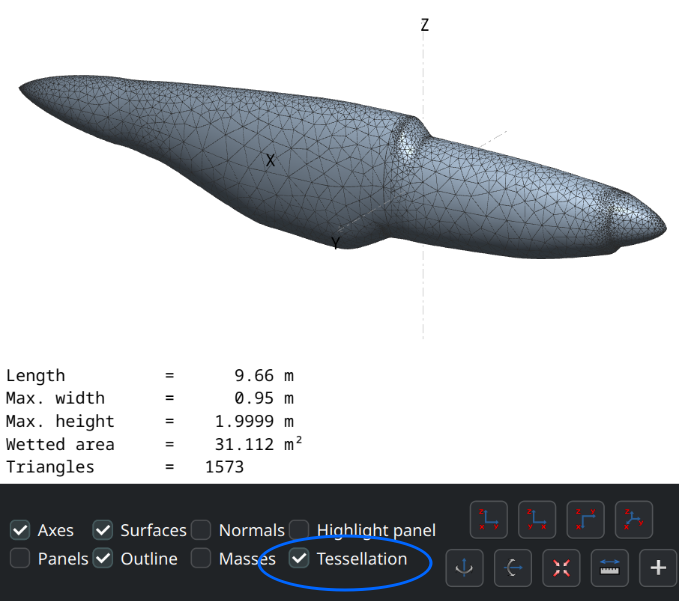
The outline of the tessellation can be viewed in the editors.
Given the variety of parts and object scales, the default tessellation settings may not be adapted to a given part and may require manual adjustment.
Settings
As of v7.55 default settings can be set in the Preferences/3d views for free tessellations in addition to ruled tessellations. These will apply only to newly created parts.
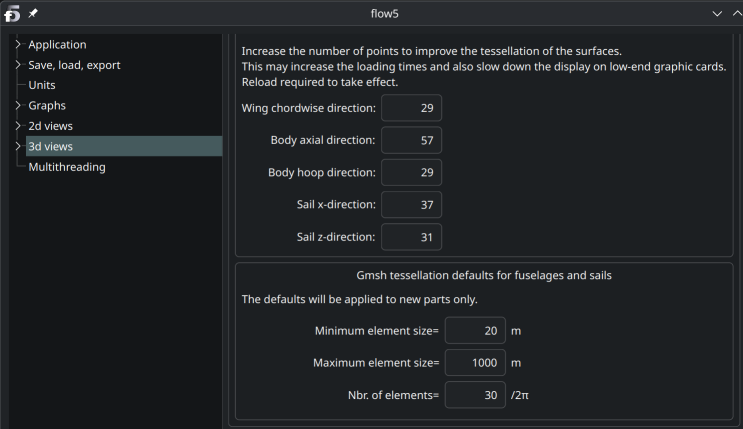
Settings for the free tessellation of existing objects can be adjusted in the editors.
Use the menu option Actions/Tessellation (Shortcut Alt+T).
The main parameter which can lead to excessively fine tessellations and large triangle sets is the Minimum element size.
The recommendation is to start with a large value, e.g. 1/20th of the model's size, and reduce it progressively.
The recommended method to improve the tessellation is to use the Number of elements/2π. This will refine the triangles in areas of high curvature and improve the quality of the rendering.